
The HTC Vive I finished Half-Life: Alyx on, over one long week in March 2020, had no idea where my eyes were. Neither did the game. Every frame drew the far corner of the lens with the same care as the spot I was actually staring at, which was usually a headcrab, and that was simply how PC VR worked, because hardly anything a player could buy tracked an eye at all.
GamingOctober 27, 2026
Half-Life: Alyx Gets Foveated Rendering on PC Six Years In, and Valve's Guide Covers 13 Headsets, Only One of Them Valve's
By Evan Marcus
Co-Founder, VR.org
Advertisement

Valve's October 26 update changes that. It adds a Foveated Rendering setting to the PC version, tucked under Advanced Performance where most people will never stumble across it, and the patch note ends with two short sentences: "Can increase rendering performance. Enable eye-tracking on your headset for best results."
Foveated rendering, if the term is new, means drawing full detail only where your eye is pointed and cheaper pixels everywhere else. Your eye only resolves fine detail in a small patch at the center of vision anyway. The trick is knowing where that patch is.
Valve already had the trick. When it updated Alyx for Steam Frame on September 14, foveated rendering sat in the patch notes alongside the ARM64 port and depth reprojection, part of the work that let the game run standalone with no PC in the room. Forty-two days later the desktop build has it too, and it is not locked to Valve's headset.
Thirteen headsets in the instructions
The patch note links to a setup guide, and the guide is the part I keep going back to. It has a section for eye tracking on thirteen headset families. One is the Steam Frame. The other twelve come from Meta, Sony, Apple, Samsung, HTC, Pico, Bigscreen, HP, Pimax, Varjo, Play For Dream and Somnium.
Most of them get there through Valve's own Steam Link, which forwards eye data from a Quest Pro, a Galaxy XR or a VIVE Focus Vision once you tick a sharing box. Virtual Desktop covers several of the same headsets. A Vision Pro needs a third-party streaming app called KRVR.
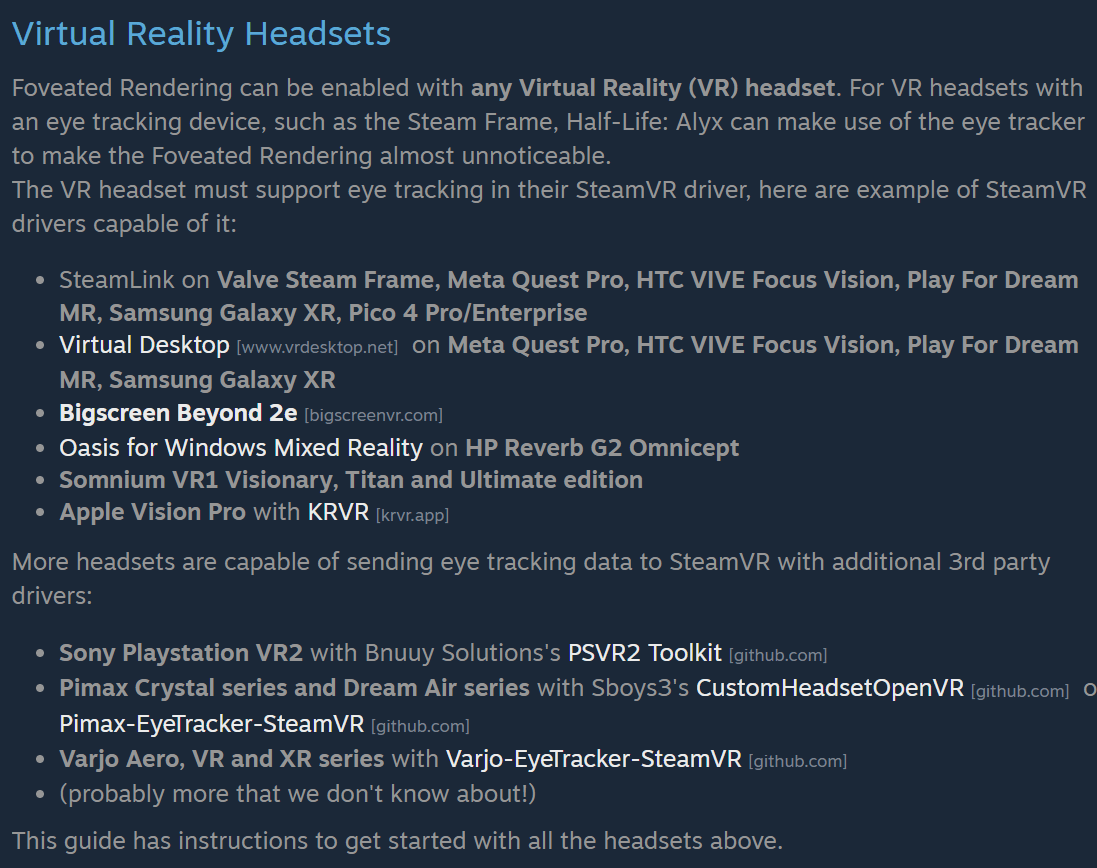
And then there is PS VR2. Sony's own PC adapter announcement says eye tracking is "not available when playing on PC" and offers foveated rendering "(without eye tracking)" as the consolation, the same wall No Man's Sky ran into when it added PC foveated rendering in September. Valve's guide routes around it. It sends PS VR2 owners to PlayStation VR2 Toolkit, an unofficial, MIT-licensed modification of Sony's PC app from a group called Bnuuy Solutions, which brings the headset's eye tracking to SteamVR. A headset built around eye-tracked rendering on PS5 needs a fan project to do the same thing on a PC, and the official instructions for a Valve game link to the fan project by name.
It is also free. The toolkit's own readme opens by telling anyone who paid for it that they were scammed, so get it from that GitHub page and nowhere else.
The name on the guide
Steam guides carry a byline. This one says mbucchia.
Advertisement
That is Matthieu Bucchianeri, and if you have flown Microsoft Flight Simulator in a headset there is a fair chance Bucchianeri's software has been on your PC. OpenXR Toolkit, the free add-on that since 2021 has bolted upscaling and foveated rendering onto games that never shipped with either, is one Bucchianeri co-created. The GitHub profile it lives under now lists Valve as the employer. Three of the drivers the guide points to come from that same account, among them a Varjo eye-tracking add-on whose repository was created on October 19, one week before the patch. Somebody wanted that list to be long.
What it actually does to the picture
Patch notes never explain mechanics. This guide does. Alyx splits each frame into a full-resolution center, a middle band rendered at a quarter of that, and an outer ring at a sixteenth, with four presets (lo, med, hi and ultra) deciding how wide the rings get before the pixels start thinning out toward the edge of the lens. The default is hi. Only ultra cuts harder.
With no eye tracker the setting still works. Every preset quietly steps down one notch, so the sharp zone gets bigger to cover for not knowing where you are looking, and it stays parked in the middle of the lens. That is the fixed kind, and the guide says it can be turned on with any headset at all. My Quest 3 has no eye tracker, so over Link it gets the fixed version, the same one an Index or anything else without eye tracking gets.
One caution, because it will save somebody a forum post. Alyx already adjusts its own resolution on the fly, so switching foveation on may not move your frame rate at all; the game can simply take the freed-up headroom and spend it on a sharper image. The guide's tip for a fair comparison is to pin the fidelity level with the launch options +vr_fidelity_level_auto 0 +vr_fidelity_level 3 while you test, then take them back out.
Frame owners playing standalone also got a line: stencil buffer tagging, enabled "to help improve reprojection quality." The comments under the guide already hold a couple of early bug reports, including an odd shine on barnacle blood, which is about what day one of anything looks like.
How to turn it on
What you need: Half-Life: Alyx on Steam ($59.99), any PC VR headset, and either an Nvidia GTX 16 series or RTX 20 series card or newer, or an AMD RX 6000 or Intel Arc A-series card running the game in Vulkan. Eye tracking is optional. It is what makes the effect close to invisible.
- Let the update finish. The setting arrived in the October 26 patch, so make sure Steam has installed it.
- On AMD or Intel, switch to Vulkan. In your Steam Library, right-click Half-Life: Alyx, open Properties, and type -vulkan into Launch Options on the General tab. On Linux the game already runs in Vulkan.
- Share your eye tracking with the PC. On a Steam Frame, turn on eye tracking under VR Settings, General, then enable "Share eye tracking data to other apps on this PC" in the Steam Link settings. Every other headset has its own route, and Valve's guide has a section for each one.
- Flip the toggle. In the game, open Options, then Performance, and press the gear icon at the bottom left to reach Advanced Performance. Foveated Rendering sits at the top. If it is missing, your graphics card or graphics mode does not qualify.
Anyone running Alyx through OpenComposite or xrizer should read the fine print first. The guide warns those compatibility layers may not pass eye tracking through, because the game asks OpenVR for it directly.
No Man's Sky added this in September. Alyx added it in October, six and a half years after launch, for headsets built by the companies Valve competes with, under instructions signed by someone who spent years doing the same job for free. Every PC VR game that ships from here gets compared with a 2020 release that now knows where you are looking.
Advertisement