
A plugin marketplace, in the sense an AI coding assistant means it, is a list of installable bundles: skills the assistant reads, and MCP servers it is allowed to call. MCP is the Model Context Protocol, the wiring that lets an assistant operate a tool instead of describing one to you. ByteDance's PICO has been publishing one of these for XR work since June, in a public repository called PICO-Intelligent-Plugins. It launched supporting five assistants. The September 29 release took that to ten, and the October 20 update added a switch for where downloads are routed.
SoftwareOctober 28, 2026
PICO Put Its XR SDK Behind Ten AI Coding Assistants, and the Whole Install Is One npm Line
By Nina Castillo
Staff Writer, VR.org
Advertisement
Installing it is one line:
npm install -g @picoxr/pico-cli
Then you run pico-cli setup. It shows you a plan before it writes anything. It marks which assistant hosts it found on your machine, then walks you through the rest: which hosts to set up, your region, spatial app or Unity project, and global configuration or a single project. Hosts you do not have are skipped with a note, not an error. A scripted run takes the same choices as flags. The region one is worth a look: cn for mainland China, row for the rest of the world, us for the United States, and it decides where downloads and services get routed.
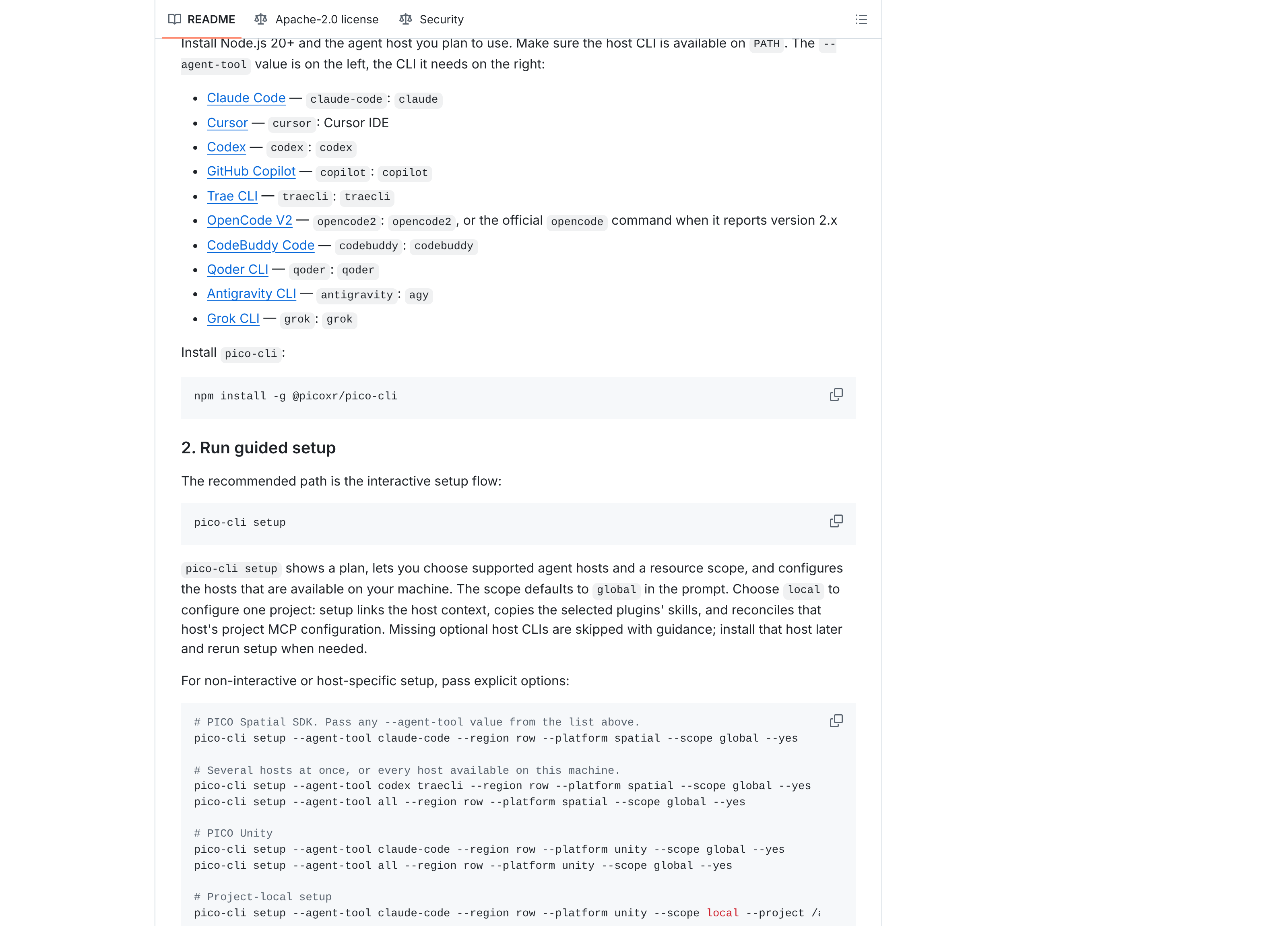
The ten, under the names the CLI wants: Claude Code, Cursor, Codex, GitHub Copilot, Trae CLI, OpenCode V2, CodeBuddy Code, Qoder CLI, Antigravity CLI and Grok CLI. Node 20 or newer. The marketplace is Apache-2.0, so you can read every skill before you let an agent act on it. Do that. The CLI that runs its MCP servers is a separate npm package, and its README says anonymous usage telemetry is on by default. pico-cli telemetry disable turns it off.
What the agent is handed
Three payloads. You pick pico-spatial-agentic-tools or pico-unity-agentic-tools, and pico-general-agentic-tools comes along either way. The general one ships a single skill, knowledge-query, which hands PICO documentation lookups to a disposable subagent so your main conversation keeps its context window. Its README says that when the knowledge sets are missing, the skill reports the limitation rather than guessing. Write that sentence on a wall.
The spatial plugin targets PICO OS 6 and the Spatial SDK. Its stated jobs read like a list of where Kotlin spatial work goes wrong: bootstrap from templates, repair code-defined entity scenes with bounds-aware placement, put content onto detected walls and tables and floors, migrate an old project without breaking it, and chase on-device bottlenecks with pico-cli perf and a Perfetto trace.
Advertisement
The Unity half lives somewhere else
Separate repository, separate Unity package, separate license. Unity-MCP-Extensions ships com.bytedance.pico.mcp-extensions, tagged 0.1.1 on October 25. The spatial plugin pairs its skills with MCP servers, including a Spatial Editor workflow that writes Kotlin and runs a Gradle build. This package hands an agent ten tools it can call inside the Unity editor.
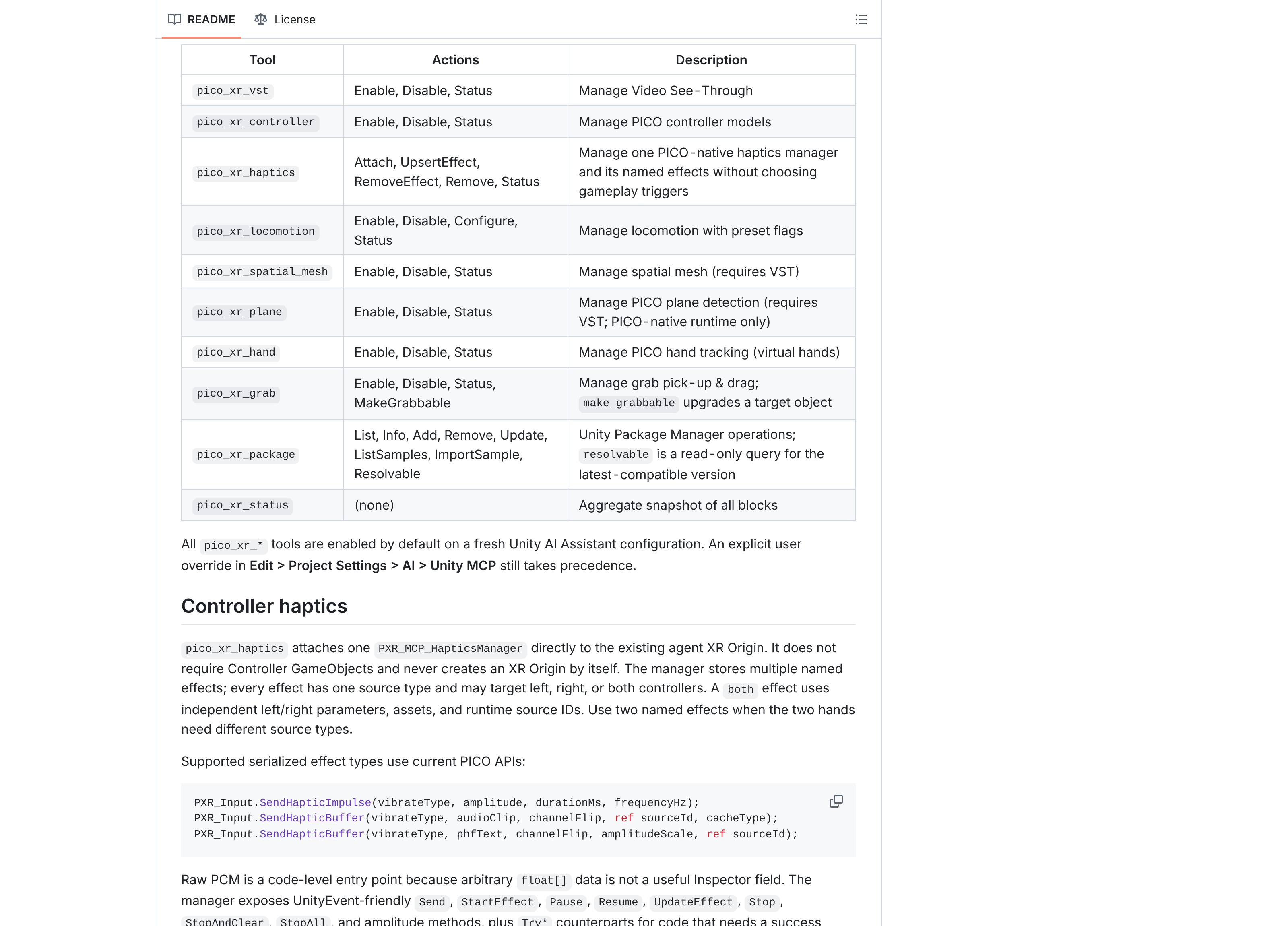
Eight of the ten are building blocks, and most of those switch with Enable, Disable and Status. pico_xr_vst turns on video see-through, which is PICO's name for passthrough. pico_xr_hand brings up hand tracking and an interactor rig so a pinch can grab. pico_xr_locomotion carries presets for move, turn, teleport, grab move, climb, gravity and jump. The other two are housekeeping: one runs Unity Package Manager operations, one reports the state of every block at once.
The design notes matter more than the list. The package calls itself idempotent, non-destructive and ambiguity-aware. Run a block twice and the second run does nothing. An XR Origin you built yourself is left alone. Scene changes go through Unity's undo stack. Those are three of the ways an agent usually ruins an afternoon. You need Unity 6000.0, PICO's Unity Integration SDK 6.1.0 or later, XR Interaction Toolkit 3.4.0, and Unity AI Assistant, pinned at 2.9.0-pre.2. Unity has only ever shipped that package's 2.x line as previews.
One limit is stated plainly. pico_xr_plane works on the PICO-native runtime only. PICO ships no plane-detection feature for OpenXR, so under OpenXR the provider is never created and the block does nothing. It is the gap I wrote about last week with OpenXR's spatial containers, now turning up inside a vendor's own tooling.
Why it surfaced this week
Something built with it showed up. On October 28 Road to VR wrote up a video of a mixed reality Super Mario 64 on a Pico headset, the game sitting in the room as a floating volume, Mario liftable out of it by the collar. Lucas Martinic built it from a decompiled copy, says it runs natively at 90fps, and credits PICO CLI alongside Anthropic's Claude Opus 5.5. There is no download and no date. Martinic started from an earlier Quest 3 version by Jonas Jakobi, built on libsm64 inside Unity, which has been on GitHub since 2023 and still asks you to supply your own ROM.
A demo nobody can install proves nothing about a toolchain. The repositories do, and they put PICO next to Google and Meta. Google wired Gemini into XR Blocks in March. Meta shipped an agent toolkit for WebXR in April and opened Quest device access to assistants in June. PICO, which changed leadership in July, has been at it since June and has pitched it mostly to developers, starting with a September blog post announcing PICO CLI 0.5.0.
The Unity side is a 0.1.1 package leaning on a preview build, and its license reserves every right to PICO, so the source is there to read, not to fork. The spatial side is where the real work sits. It is Apache-2.0 and small enough to read in an evening. Start with the skills folder, not the README.
Advertisement