
The operating system Valve built for the Steam Frame now boots on Android gaming handhelds. Not a lookalike. It is the Frame's own SteamOS image, Game Mode and KDE desktop included, repackaged by two hobby projects so it runs on the Snapdragon handhelds sold by AYN, AYANEO, KONKR and Retroid.
SoftwareSeptember 30, 2026
Five Days After the Steam Frame Shipped, Its SteamOS Was Booting on Android Handhelds
By Nina Castillo
Staff Writer, VR.org
Advertisement

MaSi's SteamOS-ARM-SM8550 came first, on September 23, five days after the headset shipped. It targets the Snapdragon 8 Gen 2 and was tested on an AYN Odin 2. The next day a developer who goes by hashtagbasit published SteamOS-ARM-Handhelds, built on MaSi's image builder, and has pushed twelve releases since. The newest went up this morning.
Why a headset OS fits a handheld
Valve's Jeff Leinbaugh explained it before either project existed. Talking to Tom's Hardware on September 14 about the Frame's Qualcomm 8650 chip, he said the engineers approached it by "really treating this like making a really capable PC that just happens to run this particular mobile hardware." A PC operating system sitting on a phone chip will run on other hardware built around that chip. Somebody just has to bring a kernel.
ROCKNIX brought it. It is an open-source Linux distribution for handhelds that already boots on these devices, with the device trees, firmware and audio configuration each model needs. Both projects take Valve's userspace, meaning everything above the kernel, and set it on top of ROCKNIX's.
The graphics side is the tidy part. According to hashtagbasit's build notes, the Frame runs Vulkan through Turnip, the open-source Mesa driver for Qualcomm's Adreno GPUs, and runs OpenGL through zink, a Mesa layer that turns OpenGL calls into Vulkan ones. The Pocket FIT has the same Adreno 750 as the Frame, so the 8 Gen 3 build keeps the Frame's Mesa untouched. Windows games take the route they take on the headset, with FEX translating x86 code for Arm and Proton handling Windows. Jordan Kuo laid out that stack in August.
What had to be switched off
If you care about the Frame itself, read this bit. The image carries services for hardware a handheld does not have, and the notes list four that crash-loop and keep the chip awake: ADB, USB gadget, a power monitor, and an FPGA service. The port masks them, which in systemd terms means they never start at all. Add a custom sleep routine and the README puts standby at around 1W, against 3W or more on the stock image.
Other fixes are ordinary handheld tuning on the kernel side. The Pocket FIT's fan sat at a fixed 27 percent. Its GPU topped out at 834 MHz instead of the 903 MHz it reaches under Android. All eight CPU cores ran on the performance governor, the small efficiency cores included, which mostly made heat. hashtagbasit wrote a fan curve, restored the 903 MHz step and steered game threads onto the big cores.
Then there is Lepton, Valve's Android layer, which Steam downloads the first time you open an Android app. When Jordan counted in September, 52 of the Frame's 130 certified games ran through it. On these handhelds it runs the Google Play Store. Anything you install from Play, or sideload as an APK, shows up as its own title in your Steam library. Games whose anti-cheat blocks emulators still won't run, per the project's Android notes.

One feature is new. On the AYN Thor and AYANEO Pocket DS, the game runs on the top screen while the bottom one shows a dashboard: Steam buttons, performance profiles, temperatures, and any apps you pin there. It works through a DRM lease, where the main compositor hands an entire display over to another program, in this case a second, smaller gamescope. The maintainer writes in the bottom-screen docs that, as far as they know, nobody had done this on Valve's own SteamOS before.
Advertisement
How it runs right now
Android Authority put MaSi's build on an AYN Odin 2 Portal this week. Prodeus ran out of the box with "playable, if variable, performance." Baba Is You and Geometry Wars 3 worked after a Proton version change. Pac-Man Championship Edition DX and Spelunky 2 never booted. Some of the unevenness is the microSD card, since the whole system and every game run from it.
The outlet's tentative verdict is that most people are better served for now by Android apps that run Windows games, the same family of tools that put Half-Life 2 on a Quest 3 in August. Fair. Those apps have had years. This has had a week, and what it offers in exchange is Valve's own interface on top of the Frame's own graphics stack.
If you want to try it
Start with the risk. Neither project is affiliated with Valve, Valve does not support either one, and installing means replacing your handheld's bootloader.
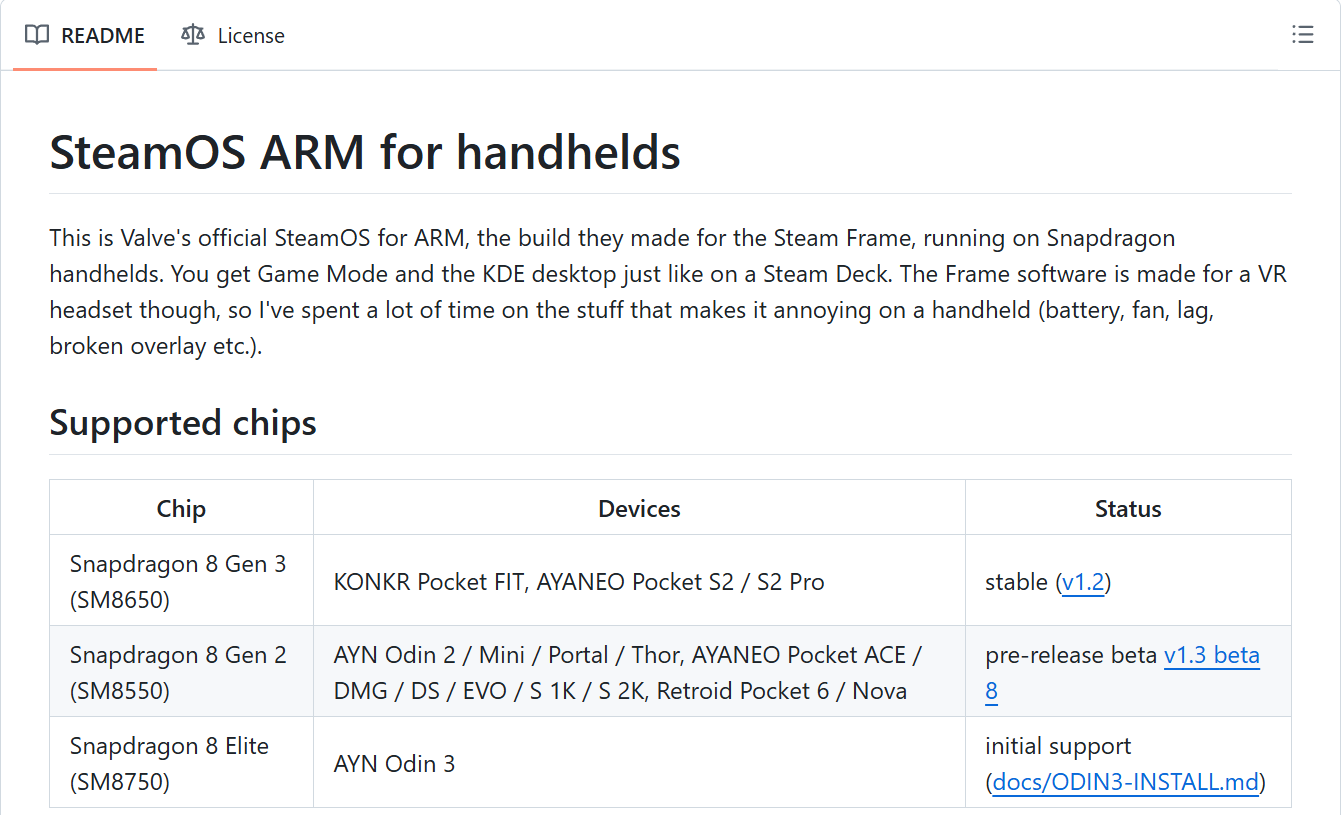
What you need: a supported handheld, a microSD card of 32GB or more (a fast A2 card, since games load from it), a PC, and a Steam account with your own games. Stable builds exist only for the Snapdragon 8 Gen 3 devices: the KONKR Pocket FIT and the AYANEO Pocket S2 and S2 Pro. The 8 Gen 2 list, which covers the AYN Odin 2 family, the AYN Thor, the Retroid Pocket 6 and six AYANEO Pocket models, is in beta. The AYN Odin 3 has initial support.
The project's install guide has the full steps. In short:
- Flash ROCKNIX's ABL to both bootloader slots. ABL is the Qualcomm stage that runs before Android and decides what boots, which we covered in August, and the ROCKNIX version adds a menu so Android still boots when you want it.
- Download the image parts from the project's GitHub releases, and check them against the SHA256SUMS file posted alongside.
- Extract the
.001file with 7-Zip, then write the resulting.imgto your card with balenaEtcher or Rufus. - Boot it. Hold Volume Down while powering on, set your device model, pick Linux, and hit START. First boot takes a couple of minutes.
- Sign in to Steam.
Frame generation needs Lossless Scaling, which you have to own on Steam. On 8 Gen 3 devices you can move the install to internal storage. That repartitions the drive, and although the installer backs up your partition table first, back up anything on the Android side you care about. Bugs go to the project's issue tracker.
A note on where the files live. MaSi's images are hosted on MediaFire rather than GitHub, which is why the steps above follow hashtagbasit's releases, the ones that come with checksums.
Own a Pocket FIT? It is worth an evening. Own something on the 8 Gen 2 list? Give the betas another week.
Advertisement