
AVP Play is a Mac app that takes a Quest game you already bought and puts it on an Apple Vision Pro. Not streamed from a PC, not mirrored in a floating window. The game is rebuilt for visionOS, signed with your own Apple developer certificate, copied to the headset, and opened from its own icon.
SoftwareOctober 10, 2026
AVP Play Rebuilds Your Quest Purchases for a Vision Pro: Seven Verified Games on Thursday, Thirteen by Saturday
By Nina Castillo
Staff Writer, VR.org
Advertisement
It went up on GitHub on Thursday under the MIT license and put out ten numbered releases in its first 23 hours. By Saturday it was on its fifteenth. The README leads with a warning rather than a pitch: "Status: first public release." Built and used by one person, on one Mac, with one Vision Pro.
What it does to a game
You sign in to Meta through ovr-platform-util, Meta's own command line tool for store publishing. AVP Play is only the window in front of it. The app asks Meta what you own and downloads just that.
Translation runs through a fork of Klepton, which AVP Play credits to Max Thomas. Klepton calls itself a JIT-less relinker and compatibility layer for running Quest and Android XR APKs on visionOS and macOS, and the job it does is turning Android ARM64 .so libraries into Apple .dylib and .framework ones. The bundled package ships that fork's full source alongside prebuilt ANGLE and MoltenVK. If those are new to you: ANGLE turns OpenGL ES calls into whatever graphics API the host actually speaks, and MoltenVK implements Vulkan on top of Apple's Metal. Quest games are Android builds expecting one of those two worlds. visionOS speaks neither.
Each game also needs a recipe, a small JSON file naming the exact build, its files and their checksums. Pin one, and a game update breaks the match.
The catch is the developer account
You need an Apple silicon Mac on macOS 14 or later with Xcode and its visionOS platform, a Vision Pro in Developer Mode paired to that Mac over the same Wi-Fi, and the Meta account that owns the games. You also need a paid Apple Developer Program membership, which Apple sells at $99 a year, and the README is blunt about why: "Free teams do not work: the entitlements the games need are missing."
Budget disk accordingly. Asgard's Wrath 2 runs about 34 GB on the Mac and the same again on the headset.
Thirteen tested, seventeen thousand listed
Seven recipes shipped with the first release on Thursday. Two days later the repository carries thirteen, every one for a game run on the author's own headset. The newest are Assassin's Creed Nexus VR and Eye of the Temple. That second one was verified in Saturday's v1.0.13 and had not reached the README's own table when the screenshot below was taken.
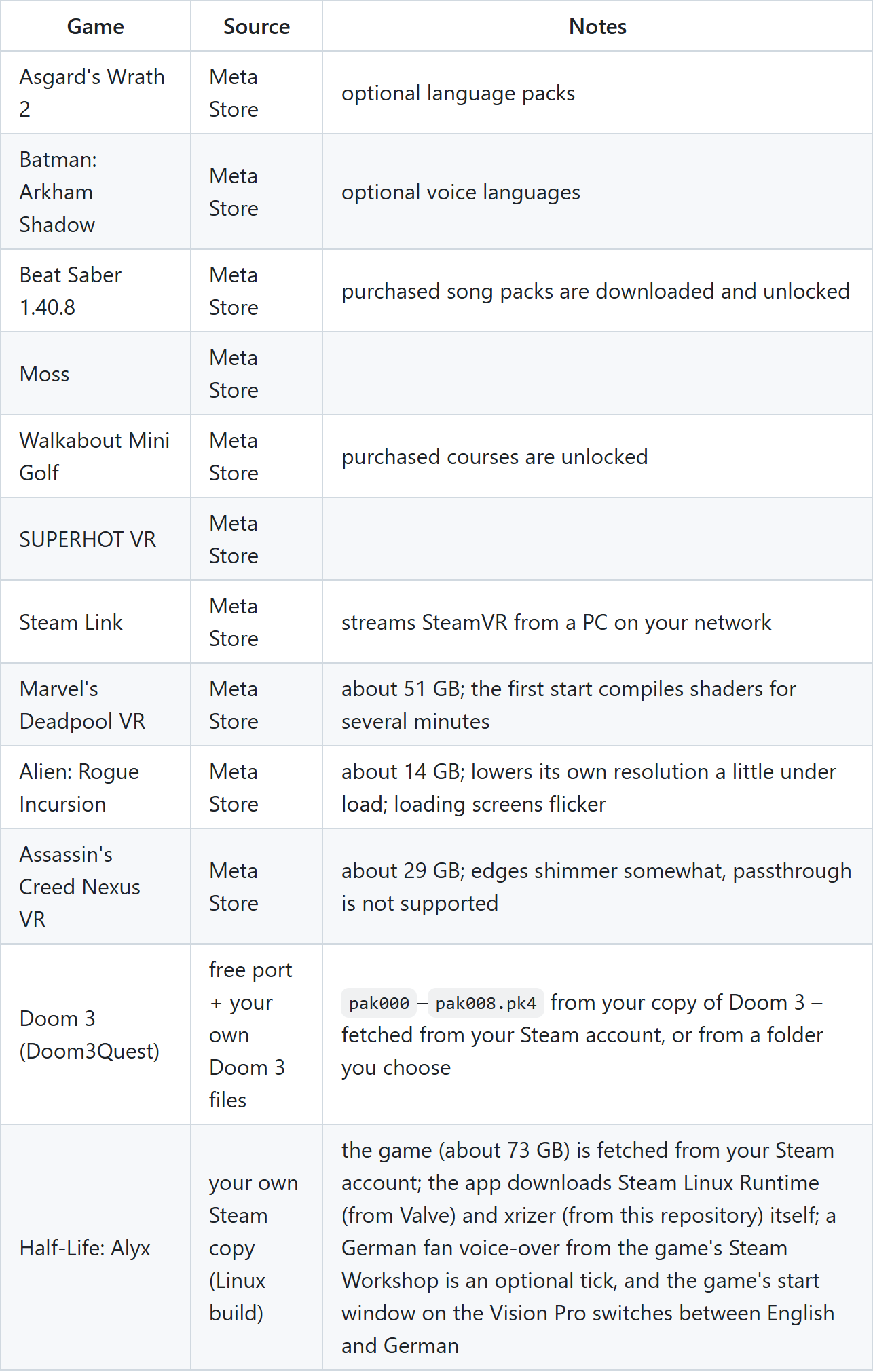
Two entries come from outside the Meta Store. Doom 3 runs through the free Doom3Quest port and wants pak000 through pak008.pk4 from your own copy, and Half-Life: Alyx uses the Linux build with Steam Linux Runtime pulled from Valve. Walkabout Mini Golf is there too, and its recipe unlocks courses you already paid for. A recipe is pinned to one build, though, and Walkabout shipped a new one on Thursday.
Advertisement
Past those thirteen, the app lists roughly 17,000 Quest titles, each carrying one of four labels.
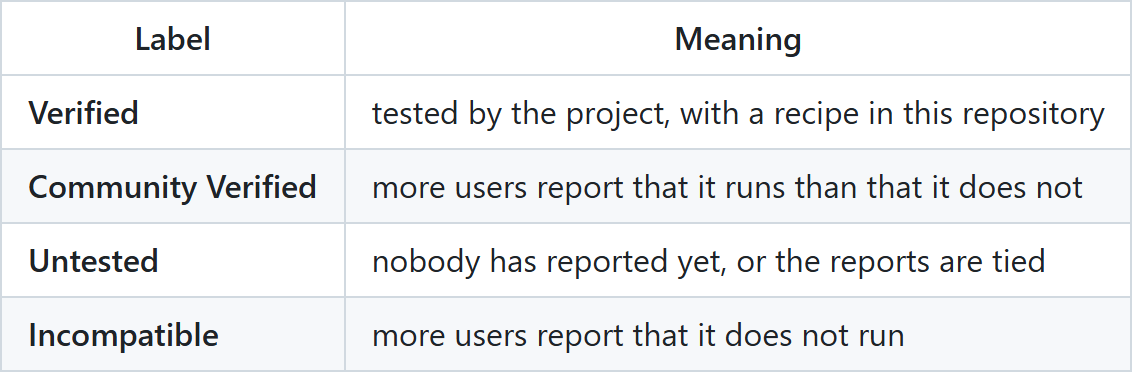
Stating the definitions instead of implying them is the right call, and it is the same instinct behind PCVR Central grading its 898 mods. Community Verified gets an extra note: "reports from users, not a guarantee." So does the list as a whole. "Each verified game needed its own adjustments before it ran, so expect an untested game not to start."
Getting it running
- Download the app. Get the .dmg from the project's releases page, drag AVP Play into Applications and open it.
- Work through the Setup page. It checks five things: Xcode, the Vision Pro, your Apple developer team, your Meta account and the toolchain. It tells you what to do about each one that is missing.
- Connect your Meta account. The app opens Meta's download page for
ovr-platform-utiland picks the file up from your Downloads folder by itself. - Install a game. Choose one under Games and click Install. A job can be stopped partway and resumed later without downloading anything twice.
Your credentials
This part is more careful than it had to be. The Meta token goes to the macOS keychain, travels only to Meta as a request header, and stays out of the logs. Ownership is rechecked daily, requests are throttled, and they stop at the first unexpected answer: "The app never tries a file to see whether Meta will serve it." Optional Steam sign-in uses Valve's SteamCMD, verified as signed by Valve before every launch. One connection does go to a server of the author's own, avpplay.martek.de, which holds the wider game list and what users report about each title. The README says the app sends it what you search for and the identifiers of games whose page you open, never your Meta sign-in, and that you can turn it off in the settings. Beyond that it promises no telemetry and no account.
Whether you are allowed to do this
The project will not answer that for you. It is "not affiliated with, endorsed by or supported by Apple, Meta, or the publishers of any game," carries no game content, and does not bypass purchase checks. Then it hands the question back: "Whether using your purchases this way is permitted by the terms of the stores and games involved is for you to check; you use this software at your own risk."
Same line AstroQuest drew on Wednesday, requiring your own dump of the game. Bring what you own, the plumbing is handled, read your own terms.
What has flipped is the direction. The projects covered here this summer went the other way, coaxing PC games onto a Quest. Now a Quest library is being coaxed onto Apple hardware, with the same class of translation layers doing the work.
Advertisement