
A recipe sits in the middle window: Black Sesame Pancakes, step one of five. The ingredient list floats in its own panel to the left. A timer panel floats to the right. All three belong to one Android app, a sample Meta calls CookVrx, and the two side panels come from the Meta VR Layout SDK.
SoftwareOctober 21, 2026
Meta's Layout SDK Gives React Native Apps Two Extra Panels on Quest, While Its Gaze SDK Can't Ship Yet
By Nina Castillo
Staff Writer, VR.org
Advertisement
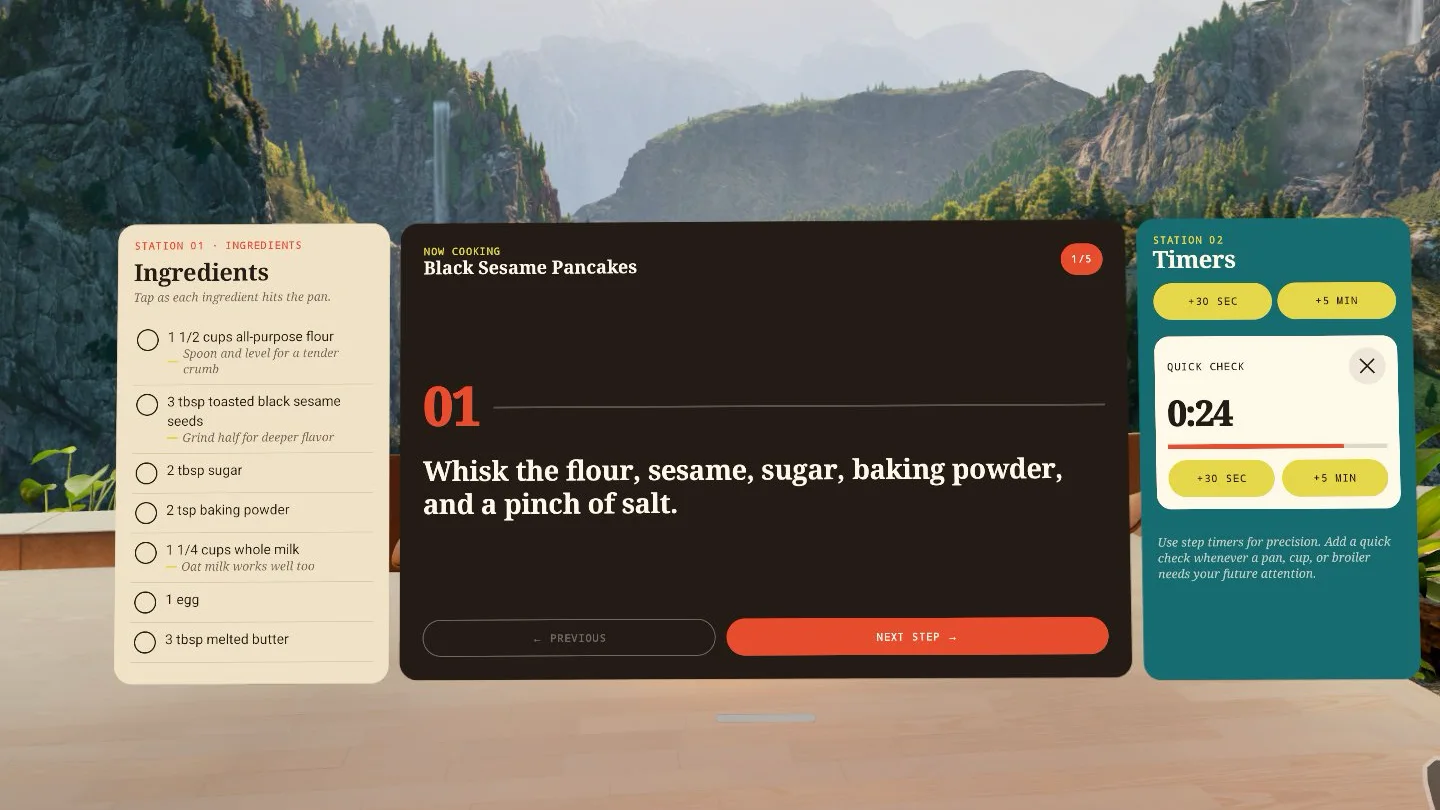
The Layout SDK shipped on September 24, the day of Connect, alongside two siblings: the Meta VR Gaze SDK and the Meta VR UI Set SDK. Glasses news buried all three. Developers are writing them up now. Callstack engineer Tomasz Włodarczyk published a React Native walkthrough on October 15, and UploadVR rounded up all three on October 20.
Meta's documentation says the Layout SDK "adds spatial windows around the main window of a Standard Android app." A spatial window is a separate panel the system places next to your main one. Your app stays flat. It can sit beside other open apps, and your activities and UI code stay as they are. You do not have to move to the Spatial SDK and its entity-component-system, the pattern Meta's 3D framework uses, where every object is an entity with data attached. Need actual 3D objects? Meta's answer is still the Spatial SDK.
What you write
In Jetpack Compose, you wrap your UI in a SpatialScene and declare each extra panel as a SpatialWindow with a key, a size and an anchor: Start, End, Top, Bottom or Center. React Native gets the same model as a SpatialSceneProvider and a SpatialWindow component. A useSpatialWindowState hook tells you where a panel actually landed: spatial, pending, inline or dropped. The packages sit on Maven under com.meta.metavrx.layout and on npm as @metavr/layout-compat and @metavr/layout-window-compat, all at 1.0.0. React Native 0.85 or newer is required.
The limits are real. Meta's best practices page says to design for "one main window and no more than two simultaneously important spatial windows," and adds that "Spatial windows do not support transparency." React Native apps get two slots. There is no Expo config plugin either, so you need a bare React Native project, or an Expo project that keeps its native Android folders.
The fallback is the clever part
The library declares no minimum OS version. On anything older than Horizon OS v207, it "uses fallback behavior instead of creating spatial windows," and a phone gets the same treatment. Each window picks its fallback. Inline, the default, draws the panel inside your main window. Drop leaves it out. So you ship one build: on a headset running v207 the timer gets its own panel, and on a phone it shows up under the recipe.
Advertisement
One naming note. That version is v207 everywhere in Meta's docs. "Horizon OS 2.7," which has turned up in coverage, is not Meta's label.
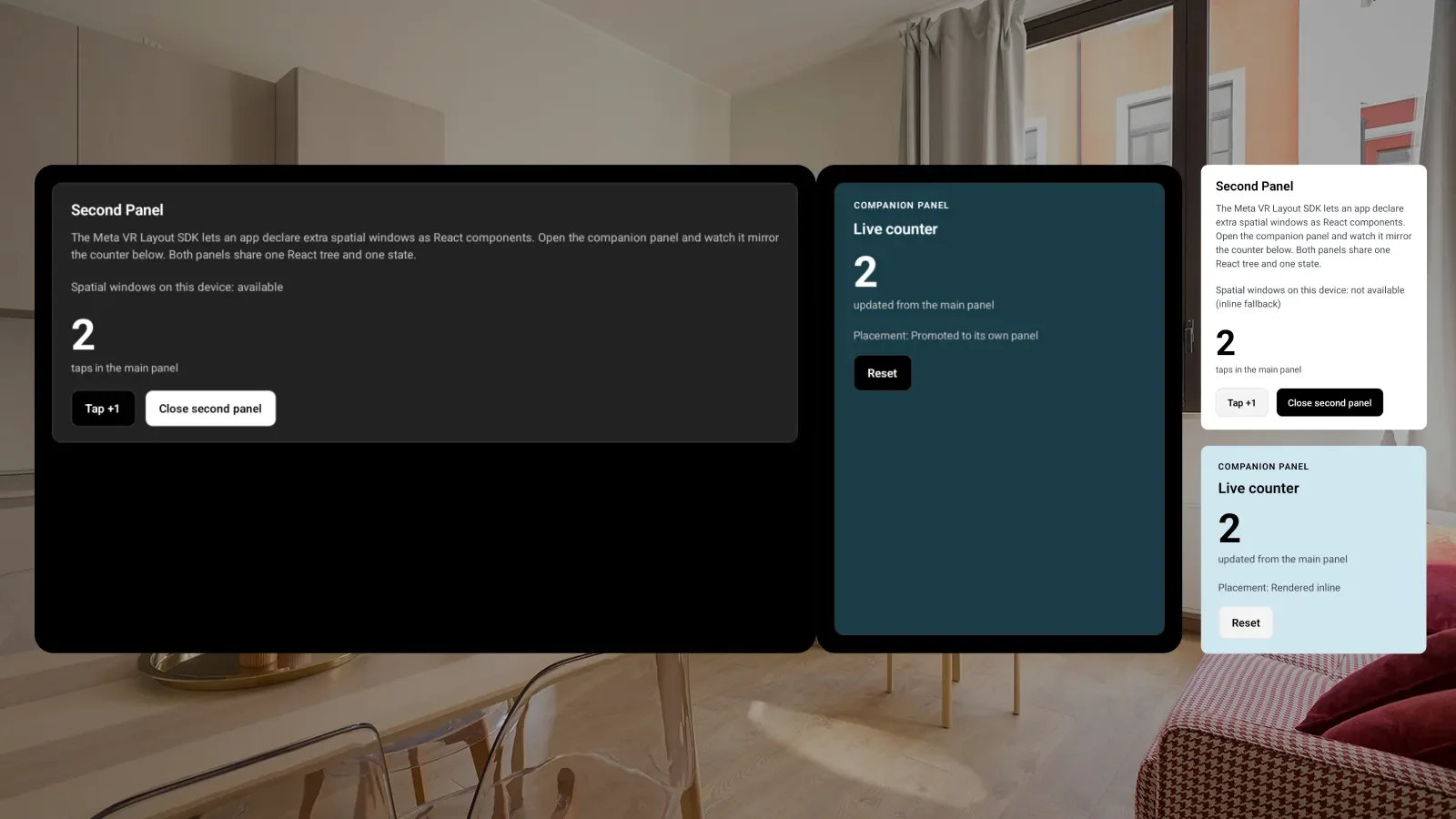
If you follow Callstack's post, start from Meta's samples rather than the repo it links. callstack/react-native-horizonos-example holds a single commit from 2025 and pins React Native 0.81.4, below the 0.85 the SDK needs, so the counter demo from the article is not in it. Meta's horizon-android-samples is MIT licensed, was last updated October 12, and has CookVrx in both Compose and React Native.
Gaze and UI Set
On glasses without controllers, the default input is Look and Pinch, which Meta describes as letting people "look at an element to target it, then pinch to select it." For a flat app, "Horizon OS handles eye and hand tracking, renders hover feedback, and sends standard touch events to your app." You get taps. You never get gaze. Most layouts need nothing more. The Gaze SDK is for the ones the system misreads, letting you mark elements as important for interaction, or not, and attach gaze tooltips.
Read its terms before building on it. Meta's Gaze SDK pages call it "unstable," hand it out by request through the developer support form, and warn that "apps submitted to the Meta Horizon Store with the SDK bundled will be rejected." Meta says "A stable version will be published in a future release before Meta VR Glasses launch," and the glasses are due in spring 2027. Prototype with it. Do not ship it.
UI Set 1.0.0 is a Compose design system covering themes, color, type and components like LabelButton, and Meta's docs call it "the successor to the Meta Horizon OS UI Set in Spatial SDK." UploadVR reports that Meta pitched it as easy for AI coding agents to implement. I could not find that wording in Meta's written documentation. What Meta has published is more concrete: agent skills for both the Layout SDK and UI Set in its Apache 2.0 agentic-tools repo, a metavr init command that sets up those skills plus an MCP server for Claude Code, Cursor, Codex and others, and a plain markdown copy of each Android doc page for language models to read.
All of this points at Meta VR Glasses, which ship without controllers and whose store puts hand-tracked apps first. But Meta says the Layout SDK "works on all Meta VR devices and is not exclusive to Meta VR Glasses," so the same panels open on a Quest running v207. Yesterday I covered OpenXR's spatial containers, the standards route for putting an immersive app in a bounded space beside other apps. This is the other door, for apps that were never immersive at all. If you already have an Android app, it is the shorter walk.
Advertisement