
Mod guide Titanfall 2
How to Play Titanfall 2 in VR: Install Guide, Controls and Fixes
Last updated: October 30, 2026
A living guide, updated as the mod changes. For what the installer does inside your game folder, see our October 4 deep dive.
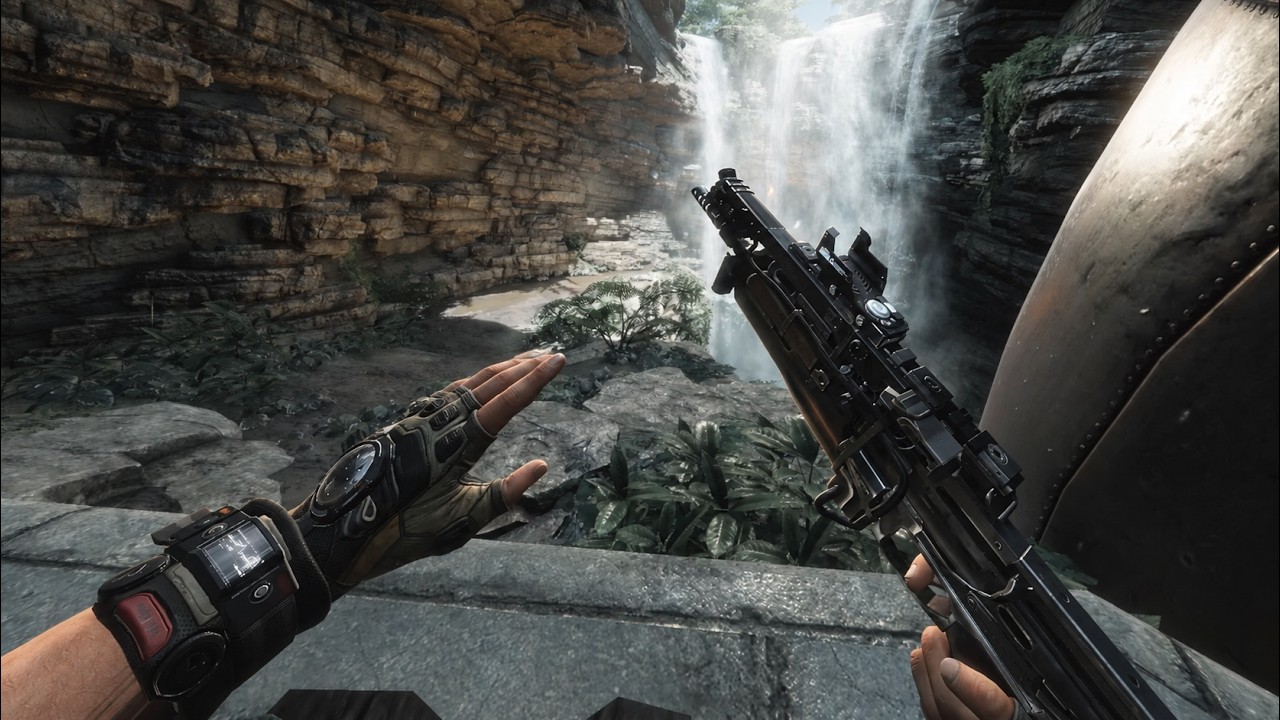
Titanfall 2 VR is a free mod by CircuitLord that puts Respawn's 2016 campaign inside a PC VR headset, with guns you aim and reload with your own hands and Titans you jump into yourself. You install it with a one-click program from CircuitLord's GitHub releases page, and you need your own copy of Titanfall 2, the EA app and a PC VR headset. The stable build covers the campaign, and a multiplayer open beta now sits on its own channel in the installer. As of October 30, 2026 the mod is at version 1.0.25, the multiplayer beta is at 1.1.25, and the installer is at v1.2.12.
| Titanfall 2 VR | |
|---|---|
| Price | Free. You need your own copy of Titanfall 2 |
| Made by | CircuitLord, a community modder, not EA or Respawn |
| Covers | The single-player campaign, plus a multiplayer open beta |
| Headsets | PC VR through SteamVR or another OpenXR runtime |
| Game versions | Steam, EA app or Xbox app, signed into the EA app |
| Current version | Mod 1.0.25 (multiplayer beta 1.1.25), installer v1.2.12 |
| Download | About 74 MB for the mod, plus the Northstar loader |
The mod at a glance, checked October 17, 2026.
What you need
A Windows PC that already runs PC VR, a headset connected to it, and Titanfall 2. The mod contains no game files. Titanfall 2 listed at $29.99 on Steam on October 17, but it goes on sale often, and it was $4.49 on October 4, so a wishlist is worth the wait if you do not own it yet. On Steam, 275,951 of its 288,465 user reviews are positive, about 96 percent, which Steam labels Overwhelmingly Positive.
You also need the EA app, signed in. Titanfall 2 will not start without it, even when you bought it on Steam. The mod publishes no minimum PC spec. For reference, Titanfall 2's Steam page recommends a GeForce GTX 1060 6GB or Radeon RX 480 8GB for the flat game, and VR draws every frame twice, once per eye, at your headset's refresh rate. Treat that recommendation as a floor.
How to install it, step by step
Tick steps off as you go. Your progress stays on this device, so you can follow along on your phone at the PC.
- Run Titanfall 2 once, flat. Install Titanfall 2 from Steam, the EA app or the Xbox app and launch it normally one time. On Steam that first launch installs the EA app, and you need to be signed into the EA app for the game to start at all.
- Download the installer from GitHub. Get CircuitLordVRModInstaller.exe from the releases page of CircuitLord's GitHub repository. It is a single small program, not a zip. Download it from GitHub and nowhere else.
- Install the mod. Open the installer. It finds your Titanfall 2 folder, checks for the EA app, then downloads the mod and the Northstar mod loader into a separate TF2VR folder inside the game directory. If the game lives under Program Files, Windows asks for administrator access to write there.
- Start your VR runtime. Start SteamVR, or whichever OpenXR runtime your headset uses, and put the headset on. Quest owners connect to the PC first with a Link cable, Air Link, Steam Link or Virtual Desktop.
- Press Launch in VR. Use the Launch in VR button in the installer. Starting Titanfall 2 from Steam or the EA app gives you the normal flat game, untouched.
- Start a new campaign. The VR campaign keeps its own saves in %LOCALAPPDATA%\Respawn\Titanfall2_VR and always starts fresh, so begin from the first mission. Your flat-screen progress stays where it was.
One tip from the installer itself: do not run Steam, the EA app or the installer as administrator. Since v1.2.9 it warns you before launch if any of them is. The same release made mod updates optional at launch, and a version menu lets you choose between the stable build, a beta the installer describes as "New features, may be unstable," and a channel labeled "Multiplayer open beta."
What it plays like
CircuitLord's README lists stereo rendering, full-body IK (your body is drawn and animated to follow your head and hands), manual reloads and Titan controls. UploadVR's James Tocchio, who played the full campaign for his review, describes finger-tracked hands, magazines you eject and replace yourself, guns you rack by hand, and double-jumps, wall-runs and slides that work independently of where you aim. You physically jump into your Titan, and hand gestures trigger its weapons and abilities.
Not all of it is smooth. Tocchio called weapon swapping "cumbersome and clunky" and said aiming down sights "takes a lot of getting used to." He also reported zero crashes across the whole campaign and called it "one of the best VR mods" he has played, a must-play that trades some of the flat game's gunplay for presence. Standing in a room, he found, wall-running and sliding lose some of the fluidity they have on a monitor.

Comfort: the honest part
Titanfall 2 is built on speed. Wall-running, sliding and the grapple are the whole movement system, and none of it maps to your body standing still in a room. Road to VR's Scott Hayden put it plainly: "The amount of motion in the game goes above and beyond even a regular flatscreen shooter." Snap turning is in the options. It helps with turning, and it does nothing for a wall-run.
If you are new to smooth locomotion in VR, keep the first sessions short and stop at the first hint of nausea rather than pushing through it.
If it will not start
| Problem | Likely cause | Fix |
|---|---|---|
| The game opens flat | Launched from Steam or the EA app | Use Launch in VR in the installer |
| The game will not start at all | EA app missing or signed out | Launch Titanfall 2 normally once, sign in to the EA app |
| An OpenXR error at launch | No VR runtime running | Start SteamVR or your headset's runtime first, then launch |
| Launch blocked, DirectX files named | Another mod replaced dxgi.dll or d3d11.dll | Remove the files the installer lists, then launch again |
| A warning about administrator | Steam, the EA app or the installer runs as admin | Restart them normally, without admin |
| Your saves are missing | VR uses its own save folder | Start a new campaign; flat saves are untouched |
Common problems and fixes, from the installer's own error handling and release notes.
Still stuck? The installer can build a crash report, and the place to send it is the project's official Discord, CircuitLord's VR Mods, which had about 5,500 members on October 17. To remove everything, use the installer's uninstall, which deletes exactly the files it recorded writing.
Is it safe to install?
The installer is open source under the MIT license, so anyone can read what it does. Every download is checked against a SHA-256 hash, and the Northstar loader is pinned to one tested release, v1.31.13, instead of whatever is newest. The mod itself is closed source, so you can audit the program that writes to your game folder but not the plugin it installs. Get it only from the GitHub releases page. Mod scenes attract rehosted copies, and nobody can vouch for those. Keep the campaign build offline, since it has no reason to go near official servers, and if you want multiplayer, use the installer's multiplayer beta channel.
Version history
The installer has shipped eight Titanfall-era builds since September 29. GitHub counted 86,847 downloads of them by October 17. That is a ceiling on players, not a count, because the installer updates itself and also serves CircuitLord's Big Walk VR mod. The mod moved from version 1.0.12 on October 4 to 1.0.17 on the stable channel by October 17.
- Sep 29, 2026 v1.2.0 Titanfall 2 VR support arrives, in an installer first written for Big Walk VR.
- Sep 30, 2026 v1.2.3 Explains OpenXR launch failures and asks for admin access when the game sits in Program Files.
- Sep 30, 2026 v1.2.4 Updates before launch, adds game exit reasons to crash reports, and makes the VR campaign always start a new save.
- Sep 30, 2026 v1.2.5 Campaign saves open from their new LocalAppData location.
- Oct 1, 2026 v1.2.6 Checks headset startup, refuses to launch when another mod has replaced dxgi.dll or d3d11.dll, and caches Northstar downloads.
- Oct 2, 2026 v1.2.7 Captures launcher errors in crash reports and installs the mod's license files.
- Oct 3, 2026 v1.2.8 Adds release channels, so you can pick a beta build, and puts session diagnostics in crash reports.
- Oct 6, 2026 v1.2.9 Warns before launch when Steam, the EA app or the installer is running as administrator, and makes mod updates optional at launch.
- Oct 23, 2026 v1.2.10 Mods now show a changelog of what changed since your installed version, and crash reports include the first exception stacks.
- Oct 26, 2026 v1.2.11 Adds an Add-ons section for community-made add-ons, starting with bHaptics support.
- Oct 28, 2026 v1.2.12 Moves add-ons to their own tab, and the Launch in VR button pulses after an install.
More VR mods we have set up
If Titanfall 2 VR is your first flat-to-VR mod, these guides follow the same approach: what you need, where the official files live, and what to expect. The full list, with a difficulty rating for each, is on our best VR mods page.
- Mod guideDiablo II: Resurrected in VR
- Mod guideAstro Bot Rescue Mission on Quest 3
- Our articleBreath of the Wild in VR with BetterVR
- Our articleMario Kart 64 in VR
- Our articleHalf-Life 2 standalone on Quest 3
Frequently asked questions
Is the Titanfall 2 VR mod free?
Yes. CircuitLord's mod and its installer are free on GitHub. You need your own copy of Titanfall 2, which listed at $29.99 on Steam on October 17, 2026 and is often heavily discounted; it was $4.49 during a sale on October 4.
Does the Titanfall 2 VR mod have multiplayer?
Yes, in an open beta. As of October 30, 2026 CircuitLord's installer lists a Multiplayer open beta channel at version 1.1.25 next to the campaign builds, and Road to VR reports NA and EU servers. The stable build still covers the single-player campaign. The mod runs on top of Northstar, a mod loader the community built for hosting its own multiplayer servers, and you still need your own copy of Titanfall 2.
Can I play Titanfall 2 VR on a Quest 3 without a PC?
No. The mod needs a Windows PC with Titanfall 2 installed. A Quest 3, Quest 3S or Quest 2 works as the display when connected to that PC with a Link cable, Air Link, Steam Link or Virtual Desktop.
Does it work with the Steam, EA app and Xbox versions of Titanfall 2?
The installer's README says it finds the game through a Steam, EA or Xbox install. Whichever store you bought it from, you must be signed into the EA app, because Titanfall 2 will not start without it.
What PC do I need for Titanfall 2 VR?
The mod publishes no minimum spec. Titanfall 2's own Steam page recommends a GeForce GTX 1060 6GB or Radeon RX 480 8GB and 16GB of RAM for the flat game. VR renders the scene twice, once per eye, at your headset's refresh rate, so plan on more headroom than that. UploadVR's reviewer reported that the mod runs well but did not list the hardware used.
Will the VR mod affect my normal Titanfall 2 game or saves?
No. The mod and Northstar install into a separate TF2VR folder, the normal game launches unmodded from Steam or the EA app, and VR saves are kept in their own folder, %LOCALAPPDATA%\Respawn\Titanfall2_VR. The flip side is that your existing campaign progress does not carry over.
Is the Titanfall 2 VR installer safe?
The installer is open source under the MIT license, checks every download against a SHA-256 hash, pins Northstar to one tested release, and records each file it writes so uninstalling removes exactly those files. The mod it installs is closed source. Download it only from CircuitLord's GitHub releases page, never from a rehost. It is a community project and is not affiliated with EA or Respawn.
Can I play Titanfall 2 VR on a Steam Frame?
Only by streaming from a Windows PC that has the game and the mod installed. The mod does not run on the headset itself. Neither CircuitLord nor Valve lists it for the Steam Frame, but streaming from SteamVR is how the Frame plays PC VR games.