
Mod guide Quest games on PC VR
Venture Quest Emulator: How to Play Quest Games on PC VR and Steam Frame
Last updated: November 7, 2026
A living guide, updated as Venture changes. For what Venture does with your Meta sign-in, read line by line from its code, see Nina Castillo's October 29 source read.
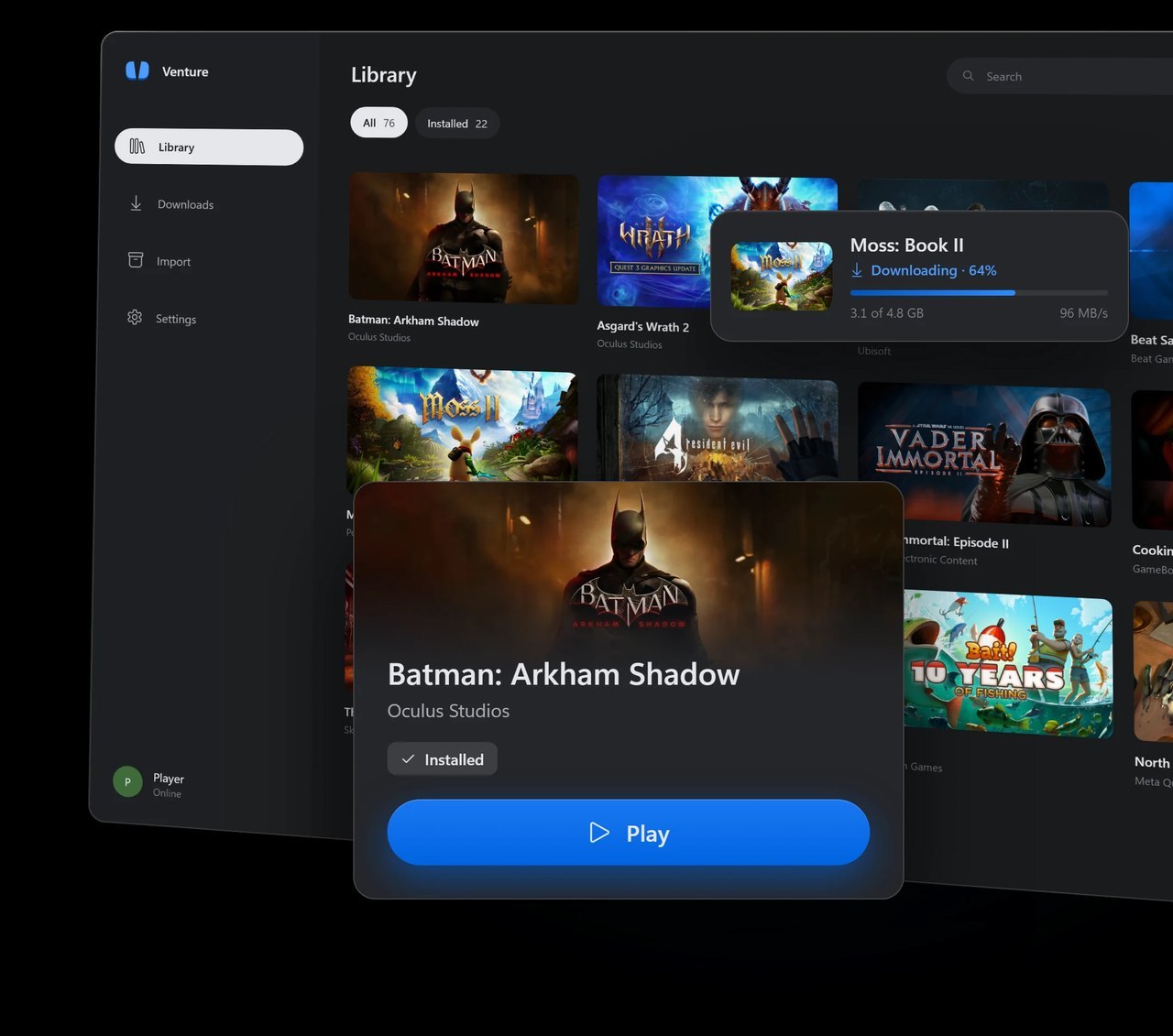
Venture is a free, open-source Meta Quest emulator for Windows and Linux. It downloads the Quest games your Meta account owns from Meta's own servers and runs them on your PC, sending the picture to a PC VR headset, a Steam Frame included, through the headset's OpenXR runtime. You do not need a Quest. It is not risk-free: running Quest purchases this way goes against Meta's terms, Meta can see Venture's traffic, and while no account bans had been reported as of November 7, 2026, the risk to your account is yours. The current version is 0.2.0.1, released November 7, hours after 0.2.0 added button remapping, per-game settings and mixed reality on more headsets.
| Venture 0.2.0.1 | |
|---|---|
| Made by | Villagers654, on GitHub |
| License | GPL-3.0-or-later, free |
| Runs on | 64-bit Windows 10 or 11, or 64-bit x86 Linux |
| Headsets | Any PC VR headset whose OpenXR runtime supports Vulkan, including a Steam Frame over Steam Link |
| Games | The Quest games your Meta account owns, downloaded from Meta |
| Tested list | 26 games, 17 of them Quest exclusives (November 3) |
| Account risk | Against Meta's terms; no bans reported as of November 7 |
Venture at a glance, from its README, releases and compatibility list as of November 7, 2026.
How Venture works
A Quest game is an Android app built for a phone-class ARM chip and GPU. Venture runs it on your PC with no virtual machine: each game is an ordinary PC process. Its ARM code is translated as it runs by a JIT built on the Eden project's fork of Dynarmic, Android's C and math libraries run as native PC code, and the game's Java runs on a desktop Java VM. OpenGL ES graphics go through ANGLE, Google's translation layer, onto your graphics card, and the game reaches your headset through OpenXR from inside its own process.
The project's site says older games built on Meta's VrApi SDK run unpatched and that 32-bit games run beside 64-bit ones. One exception is still listed as a known issue in the 0.1.4 notes: 32-bit games built for OpenXR with recent Unity versions do not start, and no later release says that changed.
What you need
A PC, a PC VR headset and the Meta account that bought your games. The headset's OpenXR runtime has to support Vulkan; Venture checks for it and says so when it does not. The project publishes no minimum graphics card. Since 0.1.1, textures are stored compressed by default so the biggest games fit 8 to 12 GB cards, and the 0.2.0 post says every game the project measured needs at least a third less video memory than on 0.1.0. Leave room on your drive too: Batman: Arkham Shadow takes 18.2 GB in the project's own screenshot. App Sharing does not count as owning a game.
| Windows | Linux | |
|---|---|---|
| System | 64-bit Windows 10 or 11 | 64-bit x86 Linux |
| Package | Venture-windows64-setup.exe, per user, no admin rights | .deb, .rpm, AUR, AppImage, Flatpak or .tar.gz |
| VR runtime | SteamVR, Meta Horizon Link or Virtual Desktop | Monado, WiVRn or SteamVR |
| Sign-in | Meta's page in a built-in window (needs WebView2) or your browser | Built-in window or your browser |
| Account | The Meta account that owns the games | The same |
What you need, from the README and release notes as of 0.2.0.1.
Install Venture, step by step
The only download is the project's GitHub releases page. Its own site, venture-emu.org, and its Discord both point there.
Tick steps off as you go. Your progress stays on this device, so you can follow along on your phone at the PC.
- Check your game on the list. Look your game up on Venture's compatibility list. A check mark means the game renders without major errors, not that anyone played it through, and a game missing from the list may still run.
- Download the installer. Get Venture-windows64-setup.exe from the latest release on GitHub and run it. It installs for your Windows user only and needs no administrator rights. The releases are not code-signed, so Windows may warn about an unknown publisher; each release lists its SHA-256 checksums in a SHA256SUMS file. On Linux, use the .deb, .rpm, AUR (venture-bin), AppImage, Flatpak or .tar.gz package from the same page.
- Sign in with Meta. Open Venture and choose Sign in with Meta. Meta's own sign-in page opens inside the app; use the account that owns your Quest games. On Windows that window needs Microsoft's Edge WebView2 Runtime. If it does not open, choose Sign in manually to finish in your own browser.
- Install a game. Pick a game in your Library and choose Install. Venture asks Meta whether your account owns it, then downloads it from Meta's own servers. The install dialog asks which drive it goes on and whether to add it to Steam.
- Start your headset's runtime. Start the OpenXR runtime your headset uses and make sure it is the active one: SteamVR, Meta Horizon Link or Virtual Desktop on Windows, or Monado, WiVRn or SteamVR on Linux. A Steam Frame uses SteamVR on the PC.
- Press Play. Press Play in Venture, or start the game from Steam if you added it there. The first launch of each game hitches while Venture translates its code. Since version 0.2.0 that work is saved, so later launches run smoother.
The Import page adds games from other sources with no ownership check. Leave it alone unless the files came off your own headset.
Venture asks GitHub for a newer release each time it starts. Since 0.1.1, choosing Update installs it for you (the Windows installer and the AppImage), checked against the release's SHA256SUMS file. Check for updates, under Runtime in Settings, turns that off. Your games, sign-in and settings live in a separate folder, and the uninstaller leaves them there.
Venture on a Steam Frame
Venture runs on your PC, not on the headset. A Steam Frame plays it the way it plays any PC VR game: streamed over Steam Link, with SteamVR as the OpenXR runtime on the PC. Venture's releases are Windows and 64-bit x86 Linux builds only, so there is no version that runs on the Frame by itself.
With Add games to Steam on, which is the default, every game you install shows up in Steam and SteamVR after Steam restarts, so you can pick it from the Frame. One Frame owner did exactly that in a GitHub report on November 1: start SteamVR on the PC, choose the game on the Frame, press Stream. His game, Ghost Giant, still would not start on November 3, after two releases with fixes for it, and the issue was closed before that last report.
Venture knows the Frame's controllers. In the current source, its Steam Frame profile puts the Quest's A and B on the right controller's A and B, the Quest's X and Y on the left controller's D-pad (down and up), and the game's menu on the left View button. You can move any of them on the Controls page.
Mixed reality on a Frame
Passthrough is on by default since 0.2.0, but Venture's mixed reality wiki page says SteamVR does not give PC apps the Frame's camera images. Without help, a mixed reality game on a Frame plays in normal VR. The wiki names two community tools that fill the gap:
- steam-link-native-passthrough by McFredward, who wrote Venture's passthrough support in pull request 34. Your room shows behind the game with real transparency. It supports Windows PCs with an NVIDIA card only, and the pull request lists HEVC streaming and SteamVR as the setup it was built for.
- steam-frame-chroma-key by spyjacob, a color key. Set Venture's Passthrough setting to Color key (magenta by default) and the same color in the tool.
Both are unofficial and not affiliated with Valve. Both need Developer Mode and SSH turned on on the Frame, and both change software on the headset; the chroma key project warns that a SteamVR update can break it. Follow each project's own README rather than a secondhand guide.
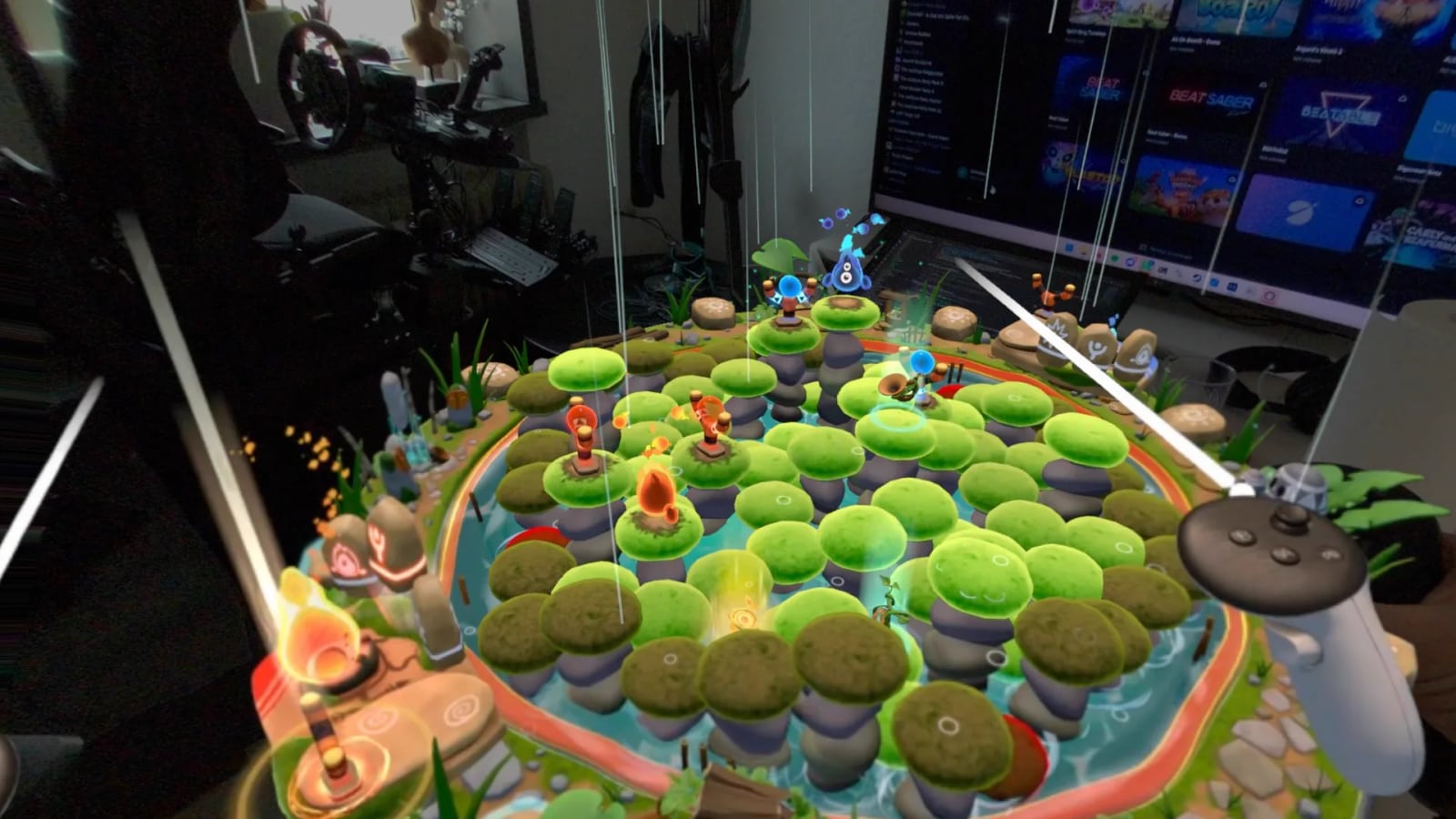
What the project has not published: frame rates on a Frame, or a list of games tested on one. Its compatibility list is kept per operating system, not per headset. For everything else about the headset, see our Steam Frame guide and the Great on Frame tracker.
Your Meta account: the risk
What Meta's terms say
Meta's Supplemental Meta Platforms Technologies Terms of Service apply whenever you use a Meta account with Meta's VR products. They license games and apps "on MPT Products devices you own or control," and they say that "except as expressly permitted by us, you may not copy, modify, ... hack, emulate, or otherwise exploit any part of our services and software." Venture's disclaimer says Meta has not endorsed it. The Meta Horizon Store Terms license purchases "on devices you own or control," but the Supplemental Terms still bind the same account. Running your Quest purchases in a PC emulator goes against them.
What Meta can see
Venture does not hide. Requests from its launcher carry the user agent "Venture/0.3 native", and its sign-in link carries utm_source=venture. We checked both in the current source on November 7, 2026. Meta can tell this traffic apart from a Quest's.
How it stays inside your library
Before every download, Venture asks Meta for your account's active entitlements, Meta's list of what you own, and a game that checks its own license gets a live answer from Meta each time. The runtime's notes say errors, wrong accounts and network failures "never grant ownership. There is no offline success cache." It refuses App Sharing with "App Sharing is not supported. Each account must own the game," and it downloads only from Meta's servers at securecdn.oculus.com.
Its developer will not fake hardware checks either. When POPULATION: ONE looped at its login screen because it wants a hardware attestation key, he called it "not really fixable" and added: "given the extremely high risk of getting banned, out of scope personally."
Bans so far
As of November 7, 2026 we found no report of a Meta account banned or restricted for using Venture: none in the 94 issues and pull requests and 186 comments on its GitHub, and none in news coverage. Road to VR advised holding off at launch because nothing guarantees Meta will not act, and we found no public statement from Meta about Venture. That can change without warning. If Meta starts acting against Venture users, this page will lead with it.
Your password and what else it contacts
You sign in on Meta's own page, auth.meta.com, in a window Venture hosts, or in your browser. Venture keeps an access token, not your password, encrypted with Windows' DPAPI or stored in your Linux keyring. Besides Meta, it contacts GitHub at start to check for updates, dpaste.com only when you upload a debug report, and, for imported games only, the OculusDB community database to look up a store name from a package name. Nina Castillo's October 29 source read covers the sign-in in detail.
What runs
The project's compatibility list, last updated November 3, has 26 games. Twenty-five are marked working on both Windows and Linux; Pickleball One is marked on Windows and untested on Linux. Read the definition before you lean on it: a check means the game "renders without major rendering errors," and "a check does not require a full gameplay pass."
Seventeen of the 26 are what the list calls Quest exclusives: games that came out only on Meta's platforms (Quest, and Rift on PC), though some also reached consoles. They include Asgard's Wrath 2, Batman: Arkham Shadow, Resident Evil 4, Marvel's Deadpool VR, Assassin's Creed Nexus VR and The Climb 2. The other nine, among them Beat Saber, Moss: Book II and Job Simulator, also have official PC VR versions.
The release notes name fixes for dozens of games beyond the list, so players are clearly running more than 26. A game that needs your Meta account signed in tells you so, and games that need a hardware attestation key, like POPULATION: ONE, do not get past their login screen.
How it compares with AXRB and Refract
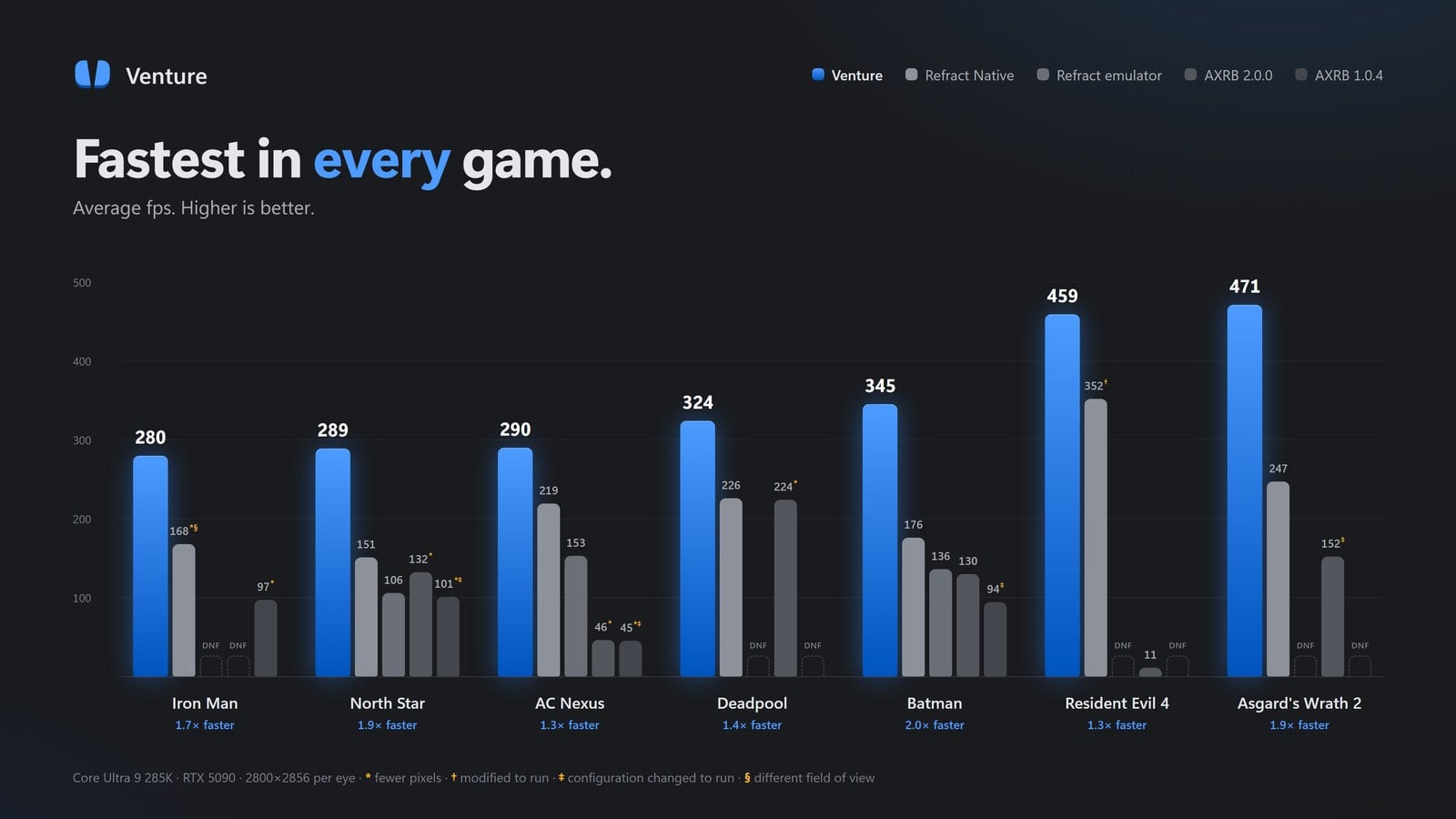
Venture is not the first project to run Quest games on a PC. AXRB and Refract came first, and Venture's README thanks AXRB "for pioneering Quest emulation on PC VR." Everything below is the project's own claim, measured on its own top-end PC; we have not found an independent test that repeats it. The README's claim is "Runs all 25 games we tested" and "The next best runs 7." Its chart puts Venture at 1.3 to 2.0 times the best competing average frame rate in seven games, measured October 21 to 25 on a Core Ultra 9 285K with an RTX 5090 at 2800 by 2856 pixels per eye. Your PC will produce lower numbers.
Settings worth knowing
The settings that matter sit in the Library, Display and Runtime groups. Since 0.2.0, the Display options and texture compression can also be set for one game on that game's own Settings tab.
| Setting | Default | What it does |
|---|---|---|
| Add games to Steam | On | Installed games appear in Steam and SteamVR after Steam restarts, so you can start them from SteamVR or a Steam Frame |
| Resolution per eye | Your runtime's | A percentage of the runtime's size, a custom size or a Quest headset's size (0.2.0) |
| Frame rate | Your runtime's | Any rate from 60 to 240 Hz, or a custom one (0.2.0) |
| Desktop mirror | Left eye, cropped | Shows the game in a window on your PC; full view, right eye or off (0.2.0) |
| Audio on PC too | Off | Also plays the game's sound on your PC's speakers, for recording or streaming (0.2.0) |
| Compress textures | Always | Keeps textures small in video memory; Off can use up to four times as much, so Venture warns first |
| Keep translated code | On | Saves translated code and shaders between launches, for less stutter (0.2.0) |
| Passthrough (mixed reality) | On | Shows your room in mixed reality games where your runtime can; Off keeps every game in VR |
| Game language | System language | The language games see, for games with no language menu |
| Downloads at once | One | Up to four at a time |
| Check for updates | On | Asks GitHub at each start and offers the new version |
Defaults from Venture's source and release notes as of November 7, 2026.
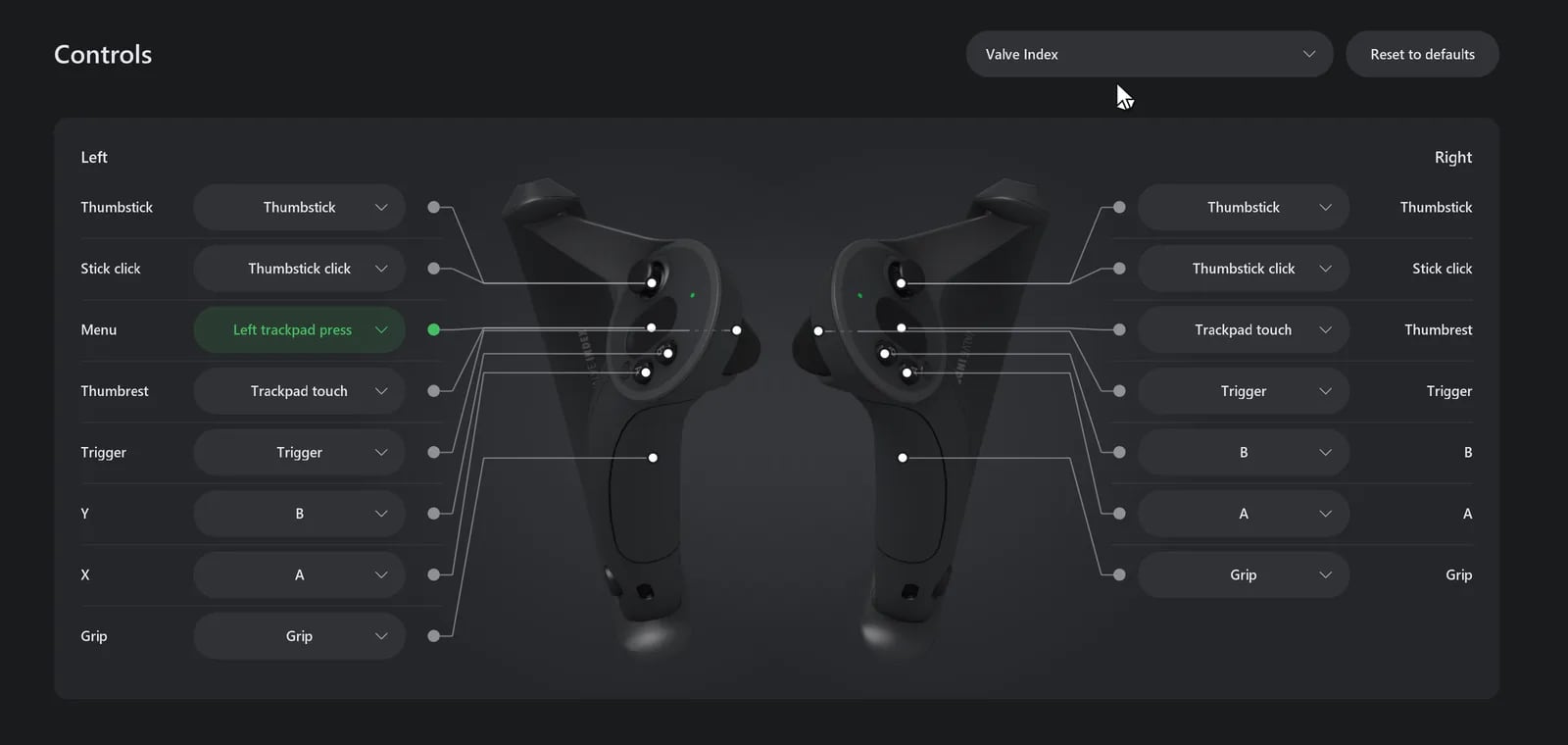
The Controls page, new in 0.2.0, draws the controller you own from its 3D model on your PC, with a line from each Quest button to the button it uses. Any Quest button can go to any button, a held button or two buttons pressed together, for every game or just one. The defaults avoid buttons your runtime keeps for itself, which is why the game's menu often sits somewhere other than the menu button.
Fixes and known issues
Most early problems were fixed within days; Venture shipped 18 releases in its first ten days. If a game crashes, click Report issue on the banner that appears, or use Upload debug report under Troubleshooting in Settings. Venture gathers the logs from your last launch into one report, uploads it as an unlisted paste that expires after 90 days, and gives you a link to put in a GitHub issue.
Reports still open on November 7 include The Climb failing to start again, in an issue filed that day, after several releases fixed it; Ultimate Swing Golf showing double vision and a broken menu, in two reports; and Batman: Arkham Shadow sometimes refusing to start, in a report from October 29. The developer has asked for fresh debug reports on the current version in each.
| Problem | Status | What to do |
|---|---|---|
| Black screen with sound on Virtual Desktop or Meta Horizon Link | Fixed in 0.1.0.1 and 0.1.0.2 | Update Venture |
| The picture looks cross-eyed over Quest Link | Fixed in 0.1.4.3 | Update Venture |
| A game crashes or goes black when video memory runs out | Textures compressed by default since 0.1.1; since 0.2.0, textures that do not fit move to system memory | Keep Compress textures on Always |
| Hitches when a game reaches a new area | Cut in 0.2.0: translated code and shaders are saved | Keep translated code on; the first launch is the roughest |
| The game's menu button does nothing | SteamVR keeps the menu button on many controllers | Move the game's menu on the Controls page |
| A game closes or sits on black asking for a Meta account | Venture says so since 0.1.1, and for games waiting on a black screen since 0.2.0 | Sign in with the account that owns the game |
| SteamVR fails to start the game's session | Venture shows a restart message since 0.1.1 | Restart SteamVR, then press Play again |
| Crashes with Steam, OBS or Overwolf overlays | Third-party Vulkan overlays are kept out of games by default since 0.2.0 | Update Venture |
| Crackling sound on Linux | Fixed in 0.1.2 and 0.1.3.1 | Update Venture |
| POPULATION: ONE loops at its login screen | Will not be fixed: it needs a hardware attestation key | None |
| 32-bit OpenXR games built with recent Unity do not start | Known issue in the 0.1.4 notes | Check the compatibility list first |
| The Climb, Ultimate Swing Golf, sometimes Batman: Arkham Shadow | Open on GitHub | Send a debug report from the current version |
From Venture's release notes and GitHub issues as of November 7, 2026.
Version history
Eighteen releases between October 28 and November 7, 2026. By the afternoon of November 7, GitHub counted 5,169 downloads of the installers across all of them: 4,447 of the Windows setup file and 722 of the five Linux packages, plus 697 of the portable Windows zip. Counts include people updating, and since 0.1.1 the updater fetches the installer too, so they overstate players.
- Oct 28, 2026 0.1.0 First release: a Windows installer and five Linux packages. Sign in with Meta, install a game, press Play.
- Oct 29, 2026 0.1.0.1 Fixes a black screen with sound on Virtual Desktop's runtime, and Venture starts telling you when a new version is out.
- Oct 29, 2026 0.1.0.2 Fixes a black screen on Meta's Link runtime, Resident Evil 4's hands pointing about 60 degrees off, adding games to Steam, and crashes when video memory runs out.
- Oct 29, 2026 0.1.0.3 Signing in through Facebook, and Meta's security checks, work again on Windows.
- Oct 29, 2026 0.1.1 Updates install themselves, textures are stored compressed by default so the biggest games fit 8 to 12 GB cards, and a running game gets a Quit game button.
- Oct 29, 2026 0.1.1.1 Fixes boxes around see-through icons that compressed textures caused, and Asgard's Wrath 2 stuck at its first screen outside English.
- Oct 30, 2026 0.1.2 Up to four downloads at once, a mods folder for each game, and on a Steam Frame, holding both sticks opens the game menu in games that do not use stick clicks.
- Oct 30, 2026 0.1.2.1 Pickleball One and other games that use Firebase start on Windows.
- Oct 31, 2026 0.1.2.2 More games start and play their videos, and freeze reports carry more detail.
- Oct 31, 2026 0.1.2.3 Fixes a Resident Evil 4 freeze while loading some areas, and several games that stopped at launch.
- Oct 31, 2026 0.1.3 Batman: Arkham Shadow's longest loading pauses are about half as long, and more games fit cards with 8 GB or less.
- Oct 31, 2026 0.1.3.1 Fixes crackling sound on Linux and a game that would not start on SteamVR.
- Nov 1, 2026 0.1.4 Adds 152 Android functions that Unity, Unreal and Oculus SDK games could stop on, and fixes Batman: Arkham Shadow on SteamVR and on AMD cards.
- Nov 1, 2026 0.1.4.1 A setting for the language games see, and The Climb 2 no longer looks cross-eyed.
- Nov 2, 2026 0.1.4.2 Importing asks for a drive the way installing does, and Batman: Arkham Shadow has sound on audio devices set above 48 kHz.
- Nov 3, 2026 0.1.4.3 Games no longer look cross-eyed over Quest Link, and Job Simulator and Beat Saber stop crashing there.
- Nov 6, 2026 0.2.0 A Controls page for moving any button, resolution and frame rate settings, per-game settings, mixed reality on more headsets including the Steam Frame, a desktop mirror, and saved translated code for less stutter.
- Nov 7, 2026 0.2.0.1 Fixes a game that stopped at its logo with no controllers, plus two layout fixes in the launcher.
More VR mods we have set up
Every mod we have covered, with the steps and a difficulty rating for each, is on our best VR mods page.
- Mod guideTitanfall 2 in VR
- Mod guideDiablo II: Resurrected in VR
- Mod guideAstro Bot Rescue Mission on Quest 3 and PC VR
- Mod guideHalf-Life 2 in VR
- Mod guideUnreal Engine games in VR with UEVR
- Mod guideGunman Contracts, the Half-Life: Alyx mod
- All modsEvery VR mod we have set up
Frequently asked questions
What is the Venture Quest emulator?
Venture is a free, open-source Meta Quest emulator for Windows and Linux PCs, made by Villagers654 and published on GitHub under GPL-3.0. It downloads the Quest games your Meta account owns from Meta's own servers and runs them on your PC, sending the picture to a PC VR headset through its OpenXR runtime. It contains no games. The current version is 0.2.0.1, released November 7, 2026.
Can Meta ban my account for using Venture?
Nobody can promise it will not. Meta's Supplemental Meta Platforms Technologies Terms license Quest software on "MPT Products devices you own or control" and say you may not "hack, emulate, or otherwise exploit any part of our services and software", so using Venture goes against Meta's terms. Venture also labels its traffic, so Meta can see it. As of November 7, 2026, VR.org found no report of an account banned or restricted for using Venture, on the project's GitHub or in news coverage, and no public statement from Meta. The risk to your account is yours.
Does Venture work on the Steam Frame?
Yes, from a PC. Venture runs on a Windows or Linux PC and the Steam Frame plays the game over Steam Link, with SteamVR as the PC's OpenXR runtime. Venture's Controls page has a Steam Frame profile that puts the game's menu on the left View button. Mixed reality games need one of two unofficial community tools for passthrough on a Frame, both of which need Developer Mode and SSH on the headset; the native one supports Windows PCs with NVIDIA cards only. There is no Venture build that runs on the Frame by itself.
Do I need a Quest headset to use Venture?
No. You need the Meta account that bought the games and a PC VR headset whose OpenXR runtime supports Vulkan, such as SteamVR, Meta Horizon Link or Virtual Desktop on Windows, or Monado, WiVRn or SteamVR on Linux. Players have filed reports from a Steam Frame, a Rift CV1, Windows Mixed Reality headsets and a Pico 4 over Virtual Desktop, and with Valve Index controllers.
Which Quest games work in Venture?
The project's compatibility list, last updated November 3, 2026, has 26 games: 25 marked working on Windows and Linux and Pickleball One on Windows only. Seventeen are Quest exclusives, including Asgard's Wrath 2, Batman: Arkham Shadow, Resident Evil 4 and Marvel's Deadpool VR. A check means the game renders without major errors; the list says a check does not require a full playthrough. Games that need a hardware attestation key, such as POPULATION: ONE, do not get past their login screen.
Can I play games I do not own, or games shared with App Sharing?
No. Venture asks Meta whether your account owns a game before every download and every launch, and it refuses App Sharing with the message "App Sharing is not supported. Each account must own the game." VR.org does not link game files, and any site offering Quest game files is offering pirated copies.
How is Venture different from AXRB and Refract?
All three run Quest games on a PC. Venture says it needs no virtual machine and runs each game as an ordinary PC process. In the project's own tests on a Core Ultra 9 285K with an RTX 5090, it ran all 25 games it tried where the next best ran 7, and averaged 1.3 to 2.0 times the frame rate of the best competing result in seven games. Those are the project's figures; VR.org has not found an independent test that repeats them.
Where do I download Venture safely?
Only from the releases page of Villagers654/Venture on GitHub. The project's own site, venture-emu.org, and its Discord both point there. Each release includes a SHA256SUMS file, and since version 0.1.1 the built-in updater checks new releases against it. The installers are not code-signed, so Windows may show an unknown publisher warning.